

Support your Appian Application
Skills Covered
This guide provides some best practices on how to support your Appian application post-launch.
Skills Checklist:
- Define the structure and purpose of an Appian application support team.
- Learn the roles needed to source your application support team.
- Leverage application monitoring and health checks to ensure optimal performance.
- Learn strategies for collecting end-user feedback.
Application Support Structure
To be ready for issues as they arise, organize a multi-tiered support team with delegated responsibilities. It’s not the only way to support an Appian application but it’s effective because different issues will require different skill sets for resolution. The following table provides a framework for organizing your application support tiers.
Application Support Tiers
Support Tier |
Responsibilities |
Required Skills |
|---|---|---|
|
Tier 1 |
Business support️ |
|
|
Tier 2 |
Application Support️ |
|
|
Tier 3 |
Platform Support️ |
|
To be ready for issues as they arise, organize a multi-tiered support team with delegated responsibilities. It’s not the only way to support an Appian application but it’s effective because different issues will require different skill sets for resolution. The following table provides a framework for organizing your application support tiers.
Support Request Examples
Support Requests |
Tier 1 |
Tier 2 |
Tier 3 |
|---|---|---|---|
|
How do I use this application? |
[emoticon:7e405c0fb3114c2594c00fd89a9d9667]️ | ||
|
Which report shows me the data I need? |
[emoticon:7e405c0fb3114c2594c00fd89a9d9667]️ | ||
|
I need to be added to a group. |
[emoticon:7e405c0fb3114c2594c00fd89a9d9667]️ | ||
|
Why don't I have the task I need? |
[emoticon:7e405c0fb3114c2594c00fd89a9d9667]️ | [emoticon:7e405c0fb3114c2594c00fd89a9d9667]️ | |
|
The data on this report is incorrect. |
[emoticon:7e405c0fb3114c2594c00fd89a9d9667]️ | [emoticon:7e405c0fb3114c2594c00fd89a9d9667]️ | |
|
There's an error in the application. |
[emoticon:7e405c0fb3114c2594c00fd89a9d9667]️ | ||
|
The system is running slower than normal. |
[emoticon:7e405c0fb3114c2594c00fd89a9d9667]️ | [emoticon:7e405c0fb3114c2594c00fd89a9d9667]️ | |
|
I'm unable to login. |
[emoticon:7e405c0fb3114c2594c00fd89a9d9667]️ | ||
|
An integration is down. |
[emoticon:7e405c0fb3114c2594c00fd89a9d9667]️ |
Build Your Support Team
You should have a clear process to show users how to request assistance and to help your multi-tiered support team guide resolution. An effective application support team should be able to respond to end-user requests by establishing a ticket tracking system, defining support priorities, and normalizing response times.
Different models follow for sourcing team members for each tier:
Support Team Roles
Power User
A power user is someone in the business who is very familiar with the application and its use cases. They understand the application's business context and can answer questions about how the application should be used.
We recommend looking for this role in your business operations team, where this skill set is commonly found.
Development Team
With training and access to business operations for questions, these team members can act in for Tier 1 support as needed.
The development team should also allocate a percentage of their time to documenting and transferring support knowledge to the dedicated application support team.
Dedicated Application Support Team
A dedicated application support team can reduce drain on the development team, given that adequate time and effort is given to transfer knowledge between teams.
Appian Platform Team
A trained Appian Administrator should support this tier. If your Deployment model is on-premises, the Administrator will need support from the team that manages the underlying infrastructure. With the Appian cloud deployment model, infrastructure support is provided as part of the service.
Roles and Support Tier Assignment
Role |
Tier 1 |
Tier 2 |
Tier 3 |
|---|---|---|---|
| Power User | [emoticon:7e405c0fb3114c2594c00fd89a9d9667]️ | ||
|
Development Team |
[emoticon:7e405c0fb3114c2594c00fd89a9d9667]️ | [emoticon:7e405c0fb3114c2594c00fd89a9d9667] | |
|
Dedicated Application Support Team |
️ | [emoticon:7e405c0fb3114c2594c00fd89a9d9667] | |
|
Appian Platform Team |
️ | [emoticon:7e405c0fb3114c2594c00fd89a9d9667] |
Monitor Performance
The Tier 2 support team should regularly monitor application performance. In particular, the support team should ensure that the application is:
- functional and not producing errors
- running efficiently and providing a good user experience
For more information on application performance, see Application Monitoring.
Application Health Check
Regular health checks will allow you to identify emerging issues early and prevent “snowballing” that can lead to major outages. Each month, the support team should run and review the results of the health check tool. This performs a comprehensive analysis of the most important logs to identify unreported problems, bottlenecks in application performance, and other risks such as violations of application design best practices.
User Feedback
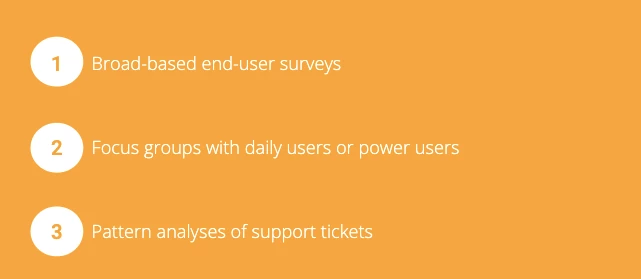
Your business is constantly evolving, as are the needs of your application’s end-user community. Business rules, data fields, and processes which made sense when the application was originally designed may become obsolete, and application features may become limitations that users must work around. Fortunately, you can easily keep Appian applications in tune with user needs by implementing the following:
Appian releases new features every quarter to enhance your capabilities. Most platform improvements update automatically, so your application improves with the platform. In some cases, the platform will release an entirely new feature or capability that wasn’t possible before.
Allocate time to review these new capabilities so you can ensure you’re taking advantage of everything the platform has to offer.
Find details on the latest features in the Release Notes.